
RM666 Game Deposit and Withdrawal Guide
Depositing money and withdrawing funds are important parts of using RM666 Game. Before making a transaction, you should know where to find the payment options, how to submit a request, and what to check if a payment is delayed. This RM 666 Game Deposit and Withdrawal Guide walks you through both processes step by step, helping you understand the requirements before moving any money.
Payment methods, transaction limits, verification rules, and processing times may change. Always check the details shown in your account before making a deposit or requesting a withdrawal.
How to Deposit Money on RM666 Game?
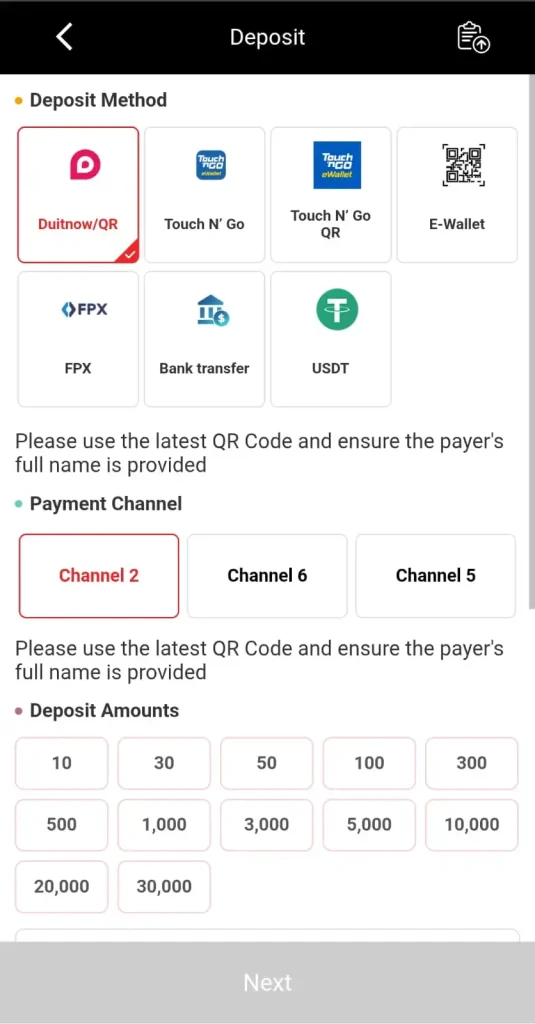
If you want to add funds to your RM666 Game account, start by checking the available payment options. Follow the steps below and review every detail before confirming your transaction.
Step 1: Log in to Your RM666 Game Account
Open the RM666 Game app or a website you have independently verified. Enter your registered login details and access your account dashboard. Before continuing, make sure you are using the correct account and a trusted website or app.
Step 2: Open the Deposit Page
Look for the Deposit, Top Up, or similar option in your account. Tap it to open the payment section. You should be able to review the available payment methods and any deposit requirements displayed by the platform.
Step 3: Select a Payment Method
Choose one of the payment methods listed on the deposit page. Available options can vary, so do not assume that a particular Malaysian bank, e-wallet, or other payment method is supported unless it appears in your verified account.
Read the payment instructions carefully. If the platform provides recipient details for a transfer, check them before sending money.
Step 4: Enter Your Deposit Amount
Enter the amount you want to add to your account. Check the displayed minimum and maximum deposit limits before moving forward. Make sure the amount fits your budget, and never use money needed for food, bills, savings, or other essential expenses.
Step 5: Review the Payment Details
Before confirming, check the amount, recipient information, payment method, and any applicable fees. A small mistake in the recipient details can create unnecessary delays, so take a moment to review everything.
If any instruction seems unusual or asks you to send money to an unverified person, stop and confirm the details through a trusted channel.
Step 6: Complete the Payment
Follow the instructions for your selected payment method. You may need to approve the transaction through your payment provider or complete an additional security check. Keep your receipt or transaction reference once the payment has been submitted.
Step 7: Check Your RM666 Game Balance
Return to your account and check whether the deposit has been credited. If the balance has not changed, review your transaction history and wait for the stated processing period.
Avoid submitting another deposit immediately. First, check the status of the original payment to reduce the risk of making the same transaction twice.
How to Withdraw Money from RM666 Game?
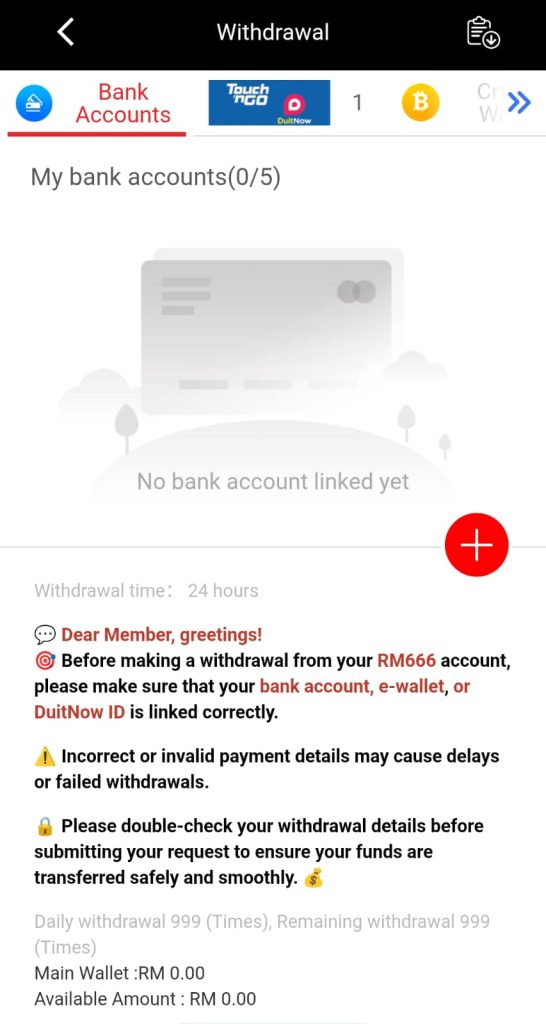
Before requesting a withdrawal, check whether your available balance meets the platform’s current requirements. Some platforms also apply verification checks, minimum withdrawal amounts, fees, or conditions for promotional funds. Review these details first so you know what to expect.
Step 1: Sign In to Your Account
Open the verified RM666 Game app or website and log in using your existing credentials. Make sure you can access your account dashboard before starting the withdrawal process.
Step 2: Go to the Withdrawal Section
Find the Withdraw or Withdrawal option. Open the page and read the instructions provided. This section should explain the available withdrawal methods and any requirements you need to meet before submitting a request.
Step 3: Check Your Eligible Balance
Review your account balance and the amount available for withdrawal. Do not assume that every displayed balance can be withdrawn immediately. If you have received a bonus or promotional credit, check the relevant terms to see whether restrictions apply.
Step 4: Choose a Withdrawal Method
Select an available withdrawal method from the options displayed in your account. Use payment details that belong to you and meet the platform’s stated requirements.
Check the destination details carefully before continuing. If you are unsure whether a payment method is supported or whether your details meet the requirements, seek clarification through a support channel you can verify.
Step 5: Enter the Withdrawal Amount
Enter the amount you want to withdraw and compare it with the displayed limits and eligible balance. Review any fees or deductions before proceeding. If the amount falls outside the permitted limits, adjust it according to the instructions on the page.
Step 6: Confirm Your Withdrawal Request
Check the amount and destination details one final time, then submit the request. Complete any verification steps shown on the verified platform. Once your request has been submitted, save the confirmation screen or transaction reference for future reference.
Step 7: Track Your Withdrawal Status
Open your transaction history, if available, and check the latest status. Your request may be marked as pending, processing, completed, or unsuccessful.
Processing times can vary depending on the platform’s review process and the payment provider. Follow the timeframe shown in your account rather than relying on claims of guaranteed instant withdrawals.
Step 8: Confirm Receipt of Funds
Check your destination payment account to see whether the funds have arrived. If the request remains pending beyond the stated timeframe, or the platform marks it as completed but the money is missing, contact verified support with your transaction reference.
Never share your password, OTP, or transaction PIN with anyone claiming they can speed up your withdrawal.
RM666 Game Deposit vs. Withdrawal
Although both processes involve moving money, deposits and withdrawals serve different purposes. Here is a quick comparison to help you understand what to check.
| Detail | Deposit | Withdrawal |
|---|---|---|
| Purpose | Add funds to your account | Request payment of eligible funds |
| Where to start | Deposit or Top Up section | Withdraw or Withdrawal section |
| Amount limits | Check the displayed deposit limits | Check the minimum and maximum withdrawal limits |
| Verification | May require payment authentication | May require account or payment verification |
| Processing time | Depends on the payment method and provider | Depends on processing checks and the payment provider |
| Important record | Payment receipt or transaction reference | Withdrawal confirmation or transaction reference |
Common RM666 Game Deposit and Withdrawal Problems
A delayed or unsuccessful transaction does not always mean your money is lost. Check the transaction status first, then follow the appropriate steps below.
| Problem | Possible Next Step |
|---|---|
| Deposit not showing in your balance | Check the payment receipt and transaction history. If the stated processing period has passed, contact verified support. |
| Deposit declined | Review the payment details and check whether your payment provider declined the transaction. |
| Withdrawal request rejected | Review the withdrawal limits, verification requirements, and applicable terms. |
| Withdrawal still pending | Check the stated processing timeframe and follow up with the transaction reference if it has passed. |
| Incorrect payment details | Contact your payment provider promptly and ask about the available options. Also contact verified platform support if needed. |
| Bonus funds cannot be withdrawn | Read the current promotional terms to understand any eligibility or wagering requirements. |
Important: If a transaction is still being processed, do not make another payment just to see whether it works. Confirm the status of the first transaction before trying again.